Recently I've been trying to make mono bindings for libawn, and I can say that this effort was successful and we have now experimental mono bindings. But since the bindings are very new, and there aren't any "real" applets written in C#, only a very limited subset of the functionality was tested, the bindings won't be part of the 0.4 release (though even the official Awn will support executing mono applets), but this should change for the next release (0.6).
Also one major issue is properly integrating the binding generation into our build system, so if there's any autotools guru, who'd like to help out, please feel free to take a look at it ;)
Of course you can find the mono-bindings branch on Launchpad > https://code.launchpad.net/~awn-core/awn/0.4-mono-bindings
This is how you can build the bindings:
Depending on what install prefix you used you might need to tell mono where to look for the libawn-sharp.dll file - if you used /usr/local as install prefix (which is the default) you will need to run Awn with `MONO_GAC_PREFIX=/usr/local/ avant-window-navigator`, otherwise you'll get an error like this when a mono applet is executed:
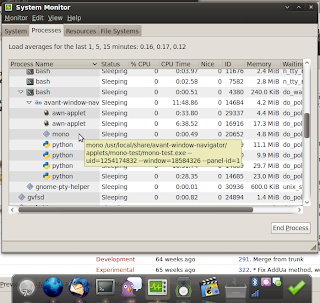
Now you're ready to hack Awn applets in C# (be sure to take a look at applets/unmaintained/mono-test in awn-extras branch for a small inspiration how to start). And now I have to show you this cool screenshot, which just shows Awn running 1 C applet, 4 python applets, 1 Vala applet and a mono applet:
Also one major issue is properly integrating the binding generation into our build system, so if there's any autotools guru, who'd like to help out, please feel free to take a look at it ;)
Of course you can find the mono-bindings branch on Launchpad > https://code.launchpad.net/~awn-core/awn/0.4-mono-bindings
This is how you can build the bindings:
- get the above mentioned branch
- if you don't have Awn 0.4 installed run `./autogen.sh && make && sudo make install`, otherwise you can skip this
- `cd bindings/mono` and...
- since the mono bindings have their own build system run `./autogen.sh`
- if autogen spits any errors, you'll need to make it happy - install gapi stuff (gtk-sharp2-gapi package) etc.
- now you need to `make -C sources api`
- once the API xml files are generated (courtesy of previous step) you can just run `make && sudo make install`
Depending on what install prefix you used you might need to tell mono where to look for the libawn-sharp.dll file - if you used /usr/local as install prefix (which is the default) you will need to run Awn with `MONO_GAC_PREFIX=/usr/local/ avant-window-navigator`, otherwise you'll get an error like this when a mono applet is executed:
WARNING **: Could not load file or assembly 'libawn-sharp, Version=0.3.9.0, Culture=neutral, PublicKeyToken=c58bb20247732067' or one of its dependencies.
Unhandled Exception: System.IO.FileNotFoundException: Could not load file or assembly 'libawn-sharp, Version=0.3.9.0, Culture=neutral, PublicKeyToken=c58bb20247732067' or one of its dependencies.
File name: 'libawn-sharp, Version=0.3.9.0, Culture=neutral, PublicKeyToken=c58bb20247732067'
Now you're ready to hack Awn applets in C# (be sure to take a look at applets/unmaintained/mono-test in awn-extras branch for a small inspiration how to start). And now I have to show you this cool screenshot, which just shows Awn running 1 C applet, 4 python applets, 1 Vala applet and a mono applet:

Comments
Post a Comment